
- Published on
--Summary--
概述
* 来声明生成器函数, 这个函数调用会返回一个生成器对象. 箭头函数无法声明生成器
生成器对象 实现了Iterator接口 有 next 方法 注意: 只有第一次调用 next , 函数逻辑才会开始调用
function * gf () {
	console.log("start")
	return 1
}

const g = gf() // 不会发生任何事
const r = g.next() // start
console.log(r) // { done: true, value: 1 }
生成器对象的 Symbol.Iterator 返回自身.
g === g[Symbol.iterator]() // true可以看作:
yield
分割函数逻辑的关键字
有点像是 函数中间的返回语句
function * g() {
	yield 1
	yield 2
	yield 3
	yield 4
	return
}

const gi = g()

gi.next() // 1
gi.next() // 2
gi.next() // 3
gi.next() // 4
gi.next() // undefined

//  {value: 1, done: false}
//  {value: 2, done: false}
//  {value: 3, done: false}
//  {value: 4, done: false}
//  {value: undefined, done: true}
独立作用域
每个生成器对象都有自己的独立作用域
function* g() {
	yield 1;
	yield 2;
	return;
}
// 独立作用域
const gf1 = g();
const gf2 = g();

console.log(gf1.next()); // 1
console.log(gf1.next()); // 2

console.log(gf2.next()); // 1
console.log(gf2.next()); // 2
yield 只能用在生成器函数的直接内部
输入和输出
这里非常必要看一下学习笔记, 具体案例
参数原则
- 第一个
next是用来启动的, 不接受参数 - 第二个
next开始接收参数, 作为第一个yield的输入 yield后面的 值/表达式 输出的值作为 对应next返回的IteratorResult的值yield只会输入next的参数, 无论yield后面的表达式是什么
输入
yield 可以接收参数用于生成器函数内部 通过第二个及之后的 next 方法传入, 第一个 next 方法的参数不会被使用(为了启动生成器函数), 但是可以通过给生成器函数传入参数来实现第一个参数.
案例:
// basic
function* g(oneParam) {
	console.log(
		'%c Mark 参数1, 通过生成器函数传入, 调用时就可以获取到 🔸>>>',
		'color: red;',
		oneParam
	);

	const twoParam = yield 1;

	console.log(
		'%c Mark 参数2, 通过第二个next方法传入 🔸>>>',
		'color: red;',
		twoParam
	);

	const threeParam = yield 2;

	console.log(
		'%c Mark 参数3, 通过第三个next方法传入 🔸>>>',
		'color: red;',
		threeParam
	);

	return;
}

const gi = g('one');

const a = gi.next();
console.log(a);
const b = gi.next('two');
console.log(b);
const c = gi.next('three');
console.log(c);
输出结果: 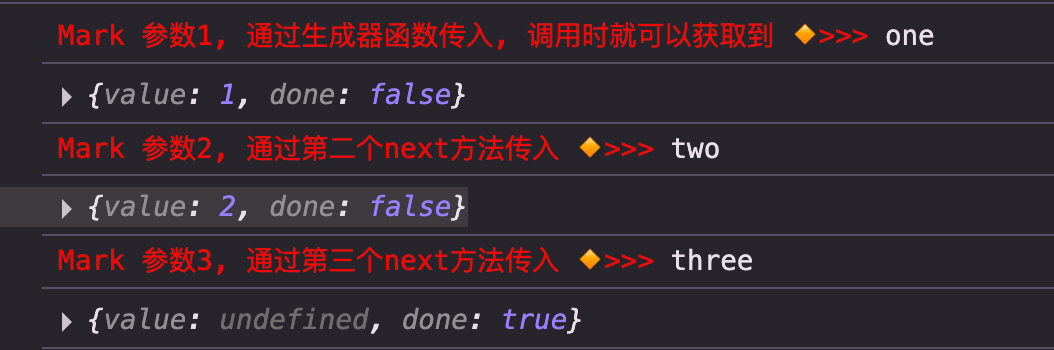
输出
yield 的值会作为 next 的输出, 即 IteratorResult 的 value 字段的值
增强 yield
[yield *](/Note_Read/红宝书 5 版/007-迭代器和生成器/Generator/yield *.md)
使用
等于是把函数分割开来进行执行
每次 return / yield 的值, 则是 IteratorResult 的 value 属性
return=>done: trueyield=>done: false
作为可迭代对象
function* iterG() {
	let i = 3
	while (i >= 0) {
		yield i--
	}
}

const g = iterG()
console.log([...g]); // [3,2,1,0]- 作为迭代器
- 填充数组
作为默认迭代器
class Counter {
	*[Symbol.iterator]() {
		yield* [1, 2, 3];
	}
}
借助生成器默认实现了迭代器协议的特点, 可以直接用来作为迭代器.
for (const i of new Foo()) {
	console.log(i)
}
对比一下普通方式实现迭代器: src/router/ECMAScript/Generator/3-usage/4-作为默认迭代器.html
实际上就是生成器等于返回一个迭代器, 这个迭代器本身也实现了可迭代协议, 返回迭代器自身
class Counter1 {
	[Symbol.iterator]() {
		let n = 3;
		return {
			next() {
				return {
					value: n,
					done: n-- <= 0
				};
			},
			// 自身也需要实现可迭代协议
			[Symbol.iterator]() {
				return this;
			}
		};
	}
}
终止
生成器对象除了 next 方法外, 还提供了两个方法, 这两个方法都可以终止生成器的进行.
return
正儿八经的终止, 接收的参数会作为最终 IteratorResult (也就是 done 为 true 的那个) 的值
function* fun(n) {
while (n) {
yield n--;
}
}
const f = fun(3);
console.log(f.next()); // 3 false
console.log(f.next()); // 2 false
console.log(f); // fun {<suspended>}
console.log(f.return('return')); // return true
console.log(f); // fun {<closed>}
console.log(f.next()); // undefined false
console.log(f.next()); // undefined false
</script>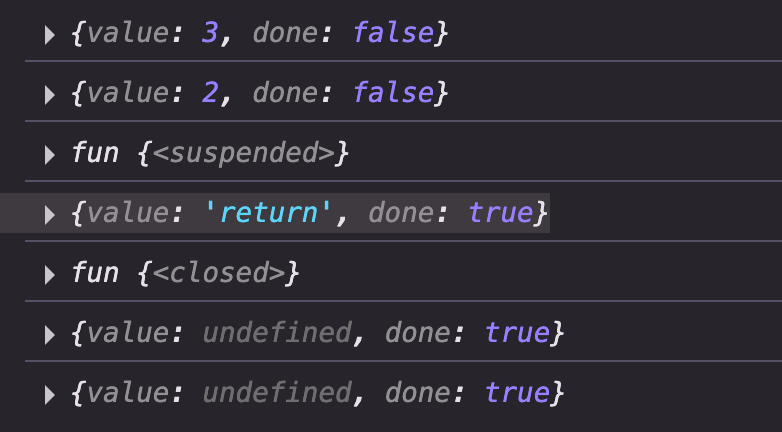 如图, 一旦使用了
 return 生成器对象的状态由 suspended 变为了 closed 并且不会再恢复.
const f1 = fun(5)

for (const i of f1) { // for of 不会消费 done 为 true 的 iteratorResult
	if (i < 3) {
		f1.return(1000)
	}
	console.log(i)
}

/*
5
4
3
2
*/
返回值
就是 value 为 return方法参数 的 IteratorResult 例如上面的案例1 console.log(f.return('return')); // { value: 'return', done: true }
throw
throw 可以抛出一个错误
function* fun(n) {
	while (n) {
		yield n--;
	}
}

const f = fun(4);
for (const i of f) {
	if (i < 3) {
		f.throw(new Error('error'));
	}
	console.log(i);
}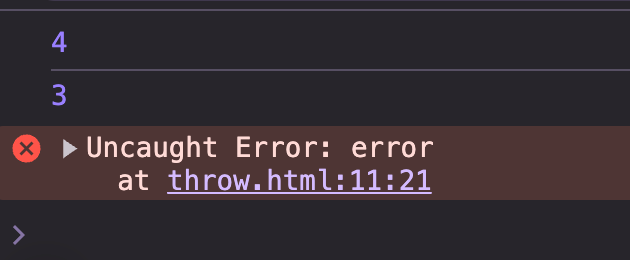
直接报错了, 同样 生成器状态变为 closed, 不会继续执行.
try...catch
生成器内部也可以使用 try...catch 拦截报错
function* fun() {
	for (const i of [1, 2, 3, 4]) {
		try {
			yield i;
		} catch (e) {
			console.log(e);
		}
	}
}

const f = fun();
console.log(f.next()); // 1 false
f.throw('foo'); // 这里被捕获, 执行了 console.log(e)
console.log(f.next()); // 3 false
console.log(f.next()); // 4 false
console.log(f.next()); // undefined true
一个看起来比较反直觉的案例
function* fun() {
	for (const i of [1, 2, 3, 4]) {
		try {
			yield i;
		} catch {
			console.log('error');
		}
	}
}

const f = fun();
for (const i of f) {
	if (i === 1) {
		f.throw();
	}
	console.log(i);
}
打印为:
error
1
3
4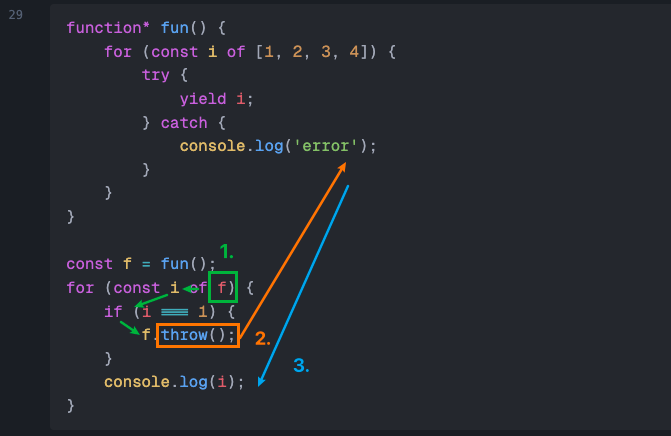
如图,
- 从开始迭代, 取出第一个
i, 才进行下一步, 此时1已经被消费了 - 进行条件判断, 进入
throw - 打印 1
- 第二个被跳过了.
catch + yield
catch 中还是可以使用 yield 继续返回, 但是 catch 中 yiled 后面是什么不重要, 只要 yield 了, 最终输出的还是原迭代中的值.
还是上面的案例, 改一行代码
function* fun() {
	for (const i of [1, 2, 3, 4]) {
		try {
			yield i;
		} catch (e) {
			console.log(e);
			yield '这里是什么无所谓, 只要 yield 还是之前应该的值, 例如这里是 2';
		}
	}
}

const f = fun();
for (const i of f) {
	if (i === 1) {
		f.throw('foo');
	}
	console.log(i);
}
可以发现输出结果和普通的迭代一样. 说明 catch 中虽然再次 yield 尝试补救, 但是是没有用的.
外部抛错
如果生成器函数还没开始执行(第一次调用 next)就抛错, 那么生成器内部是无法捕获的.